
Support Blog
How to Build an RFID Library Management System with JENCE J4212U. (V1)
May
In the modern era of radio frequency identification, libraries are evolving from traditional quiet spaces into high-tech hubs of automated efficiency. An RFID library management system is no longer a luxury—it is a necessity for modernizing inventory, securing assets, and improving the patron experience. At the heart of this revolution is the JENCE J4212U General Purpose UHF RFID Reader Writer, a technology powerhouse that bridges the gap between physical books and digital intelligence.
This comprehensive guide explores how to build a full-fledged rfid system for libraries, focusing specifically on high-traffic desk-side operations such as new book inclusion, rentals, and returns using an ESP32 controller.
Subscribe to our newsletter :
What is an RFID Library Management System?
An rfid library system utilizes rfid technology to track books, media, and equipment. Unlike traditional barcodes that require a direct line of sight, rfid tags can be read through book covers, inside bags, and even in stacks. This allows for significantly faster processing at the circulation desk, as librarians no longer need to find and scan individual barcode labels.
Why UHF RFID?
While many older libraries used HF (13.56 MHz), modern rfid solutions have shifted toward UHF RFID (902-928MHz). UHF rfid technology offers a significantly long range rfid capability. While the JENCE J4212U is optimized for desktop range (up to 120cm), the same uhf tag on a book can be picked up by rfid security gates at a distance of 3-5 meters, providing a unified solution for both circulation and security.
Materials and Tools Required
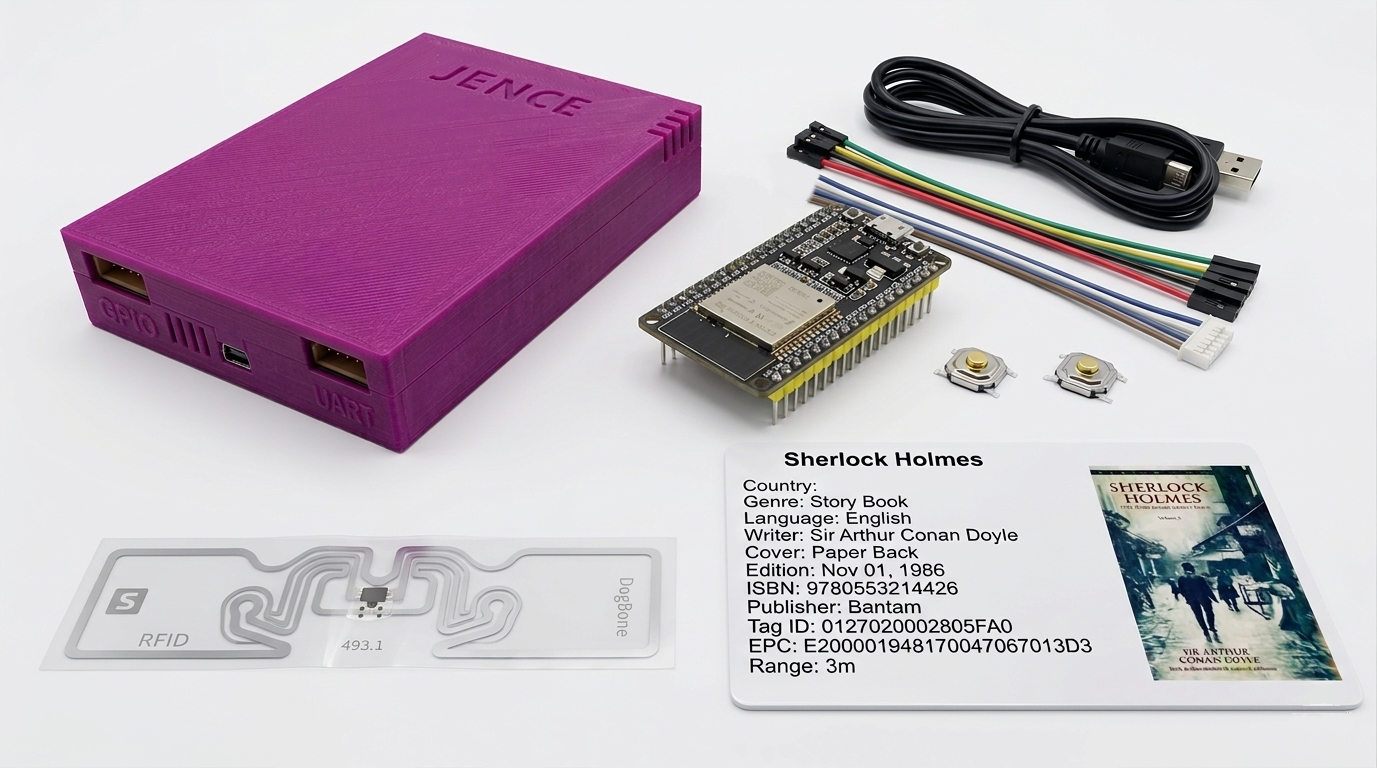
- JENCE J4212U Desktop UHF Reader Writer (1 piece/set). Get it on Amazon
- ESP32 Development Board 38 pins (1pc | Any standard 30-pin board works)
- USB Cable (1pc) | For PC to ESP32 connection, Code upload and Power
- UHF RFID Tags (2+pcs | DogBone for max range, 3 given with J4212U Package, Attach them on the Book) Amazon
- Tactile Switch (2pcs) | Can Use any similar switch for trigger
- Hook-up Wires (9/10pcs | Jumper wires
- Breadboard (Optional) (1pc | For prototyping)
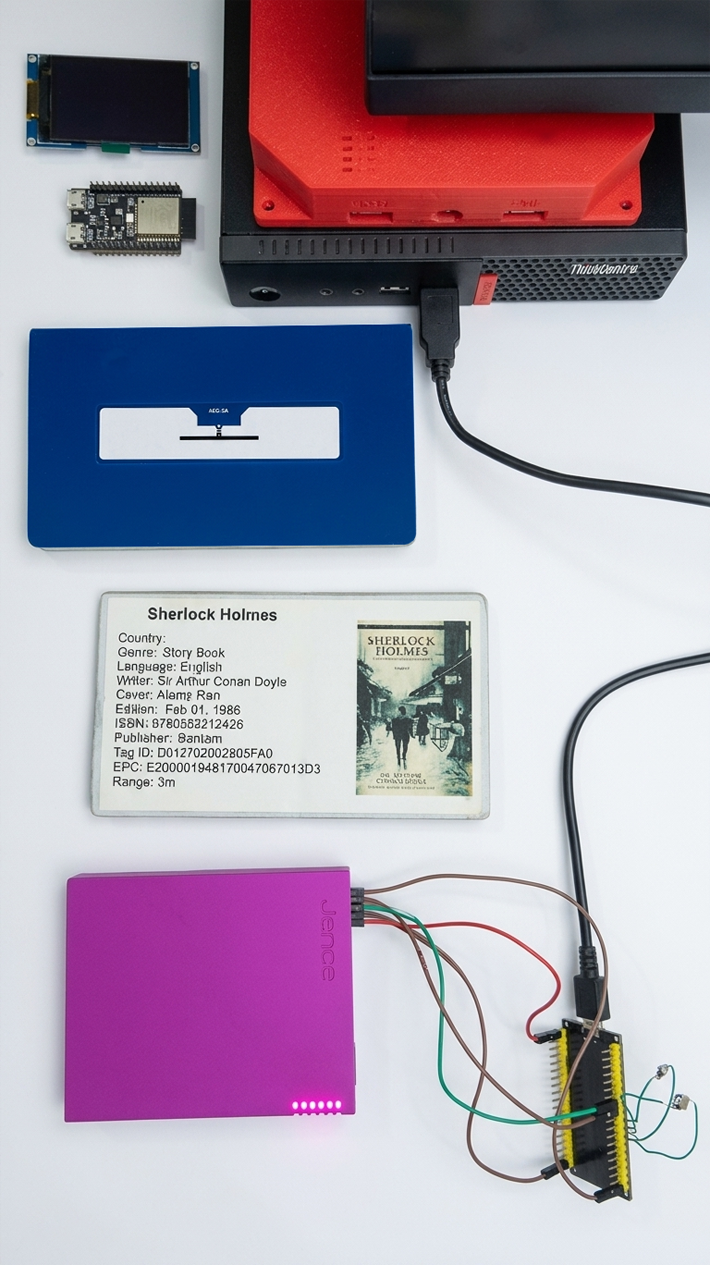
Building a robust rfid tracking system requires a synergy of hardware and software. For a professional desk-side implementation, we use a hybrid setup that combines micro-controller agility with professional-grade RFID sensing:
- The Brain (ESP32): An ESP32 serves as the central controller. It is connected to the computer via a USB cable for power and serial monitor logging (typically at 115200 baud).
- The Sensor (JENCE J4212U): The J4212U is connected to the ESP32 via its UART port. On the ESP32, this usually utilizes Serial2 (GPIO 16 for RX and GPIO 17 for TX). This direct serial connection allows the ESP32 to command the reader to perform inventory scans or write new EPC data.
- Physical Interface (Buttons):
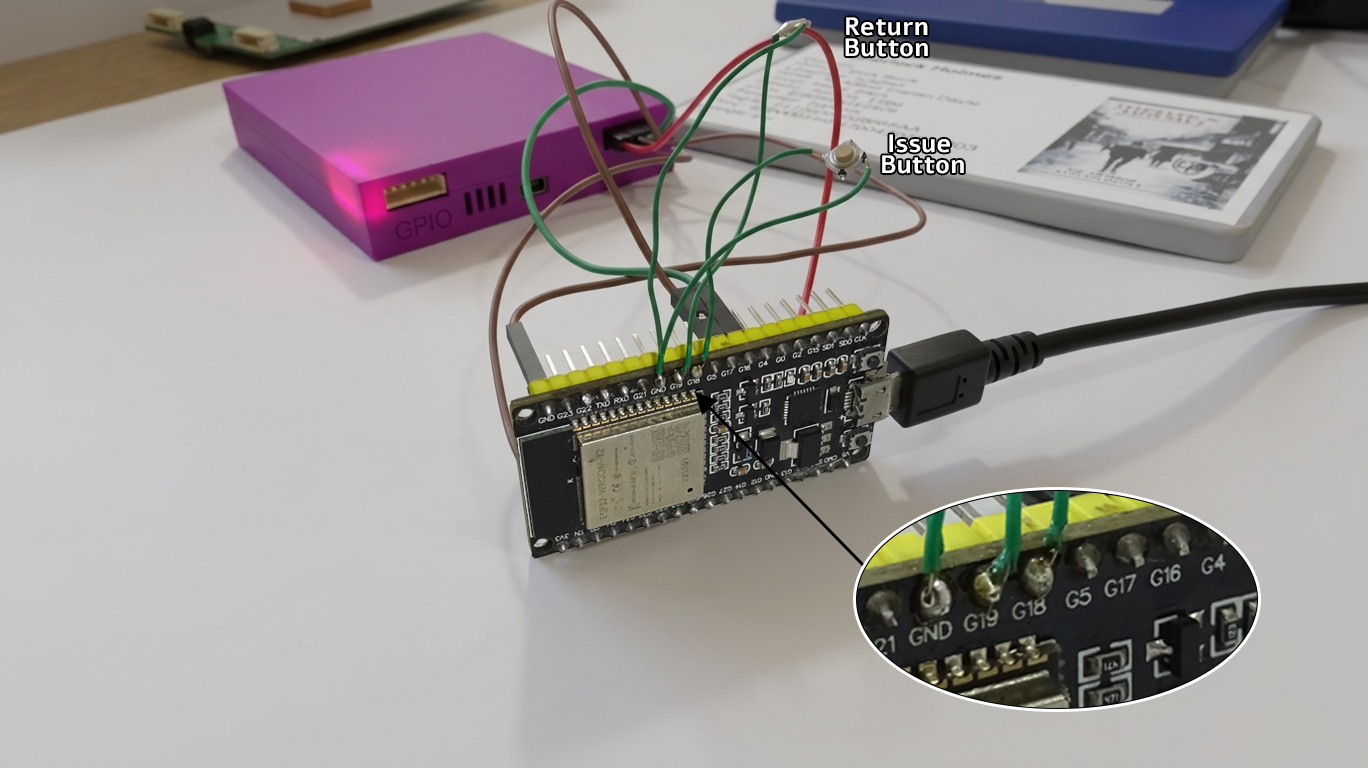
- Issue Button (GPIO 18): One end is connected to G18, and the other to the ESP32 Ground. Clicking this initiates ISSUE MODE.
- Return Button (GPIO 19): One end is connected to G19, and the other to Ground. Clicking this initiates RETURN MODE.
- The Labels: Library rfid tags (like rfid stickers or uhf rfid labels) are applied to the inside cover of every book. These are passive rfid tags, meaning they do not require a battery.
Step-by-Step: the “New Book Inclusion” Workflow

The “New Book Inclusion” process is the first time a book enters your rfid system.
Phase 1: Physical Tagging
Before setting up the gate logic, you need to know the unique EPC (Electronic Product Code) of the tags you want to authorize.
- Software Download: Download the open-source SDK and Demo App from the JENCE GitHub repository: https://github.com/jence/j4210u-app
- Initial Scan: Connect the J4212U directly to your PC (Windows, Mac, or Linux) using the provided USB cable.
- Run the Demo: Use provided demo application. J4210u-app-3.0.0/platform/”your OS”/j4210u.exe
- Identify Tags: Scan your RFID tags (stickers or inlays). The software will display a list of all detected tags and their unique EPC values (usually a long hexadecimal string).
- Authorization List: Copy the EPC values of the tags you want to authorize (your car’s tag) into a text file. You can then hardcode these values into the ESP32 program.
Phase 2: Data Encoding
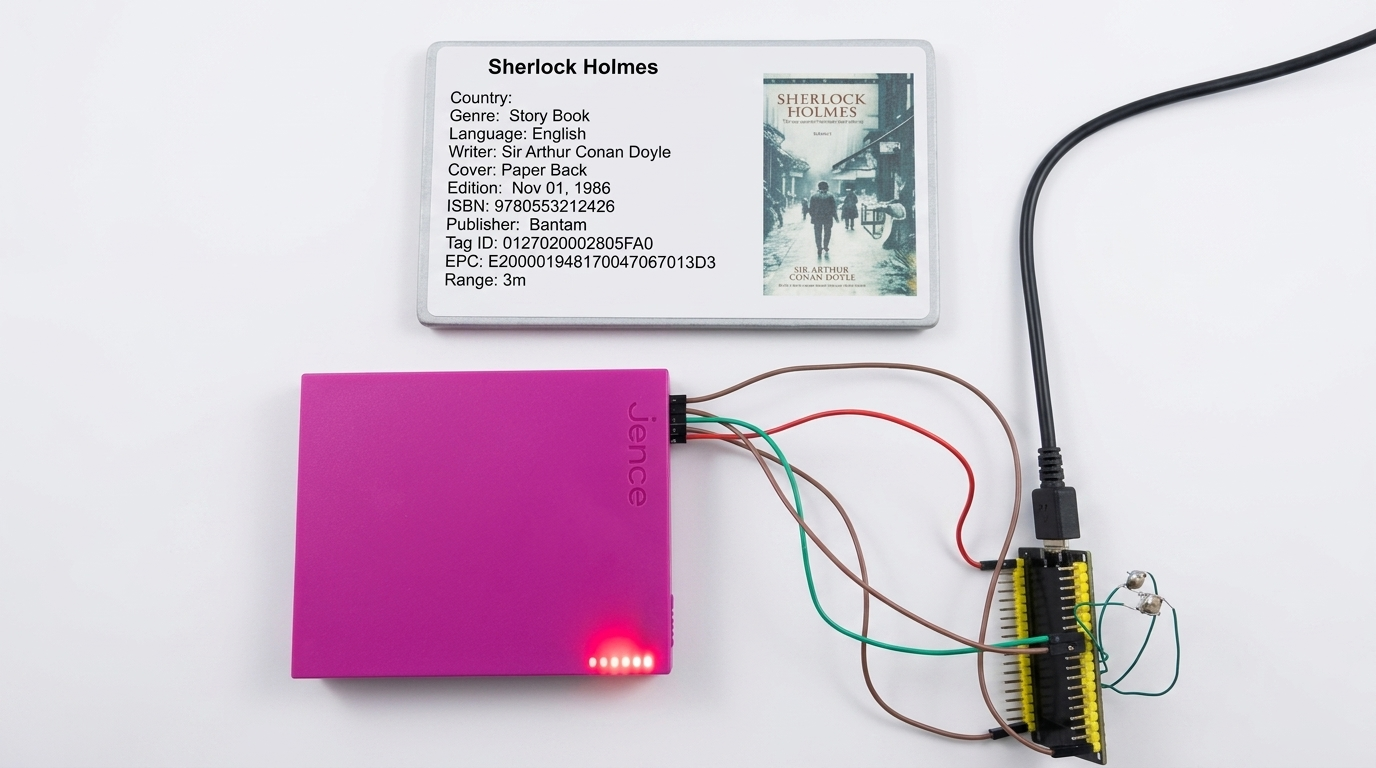
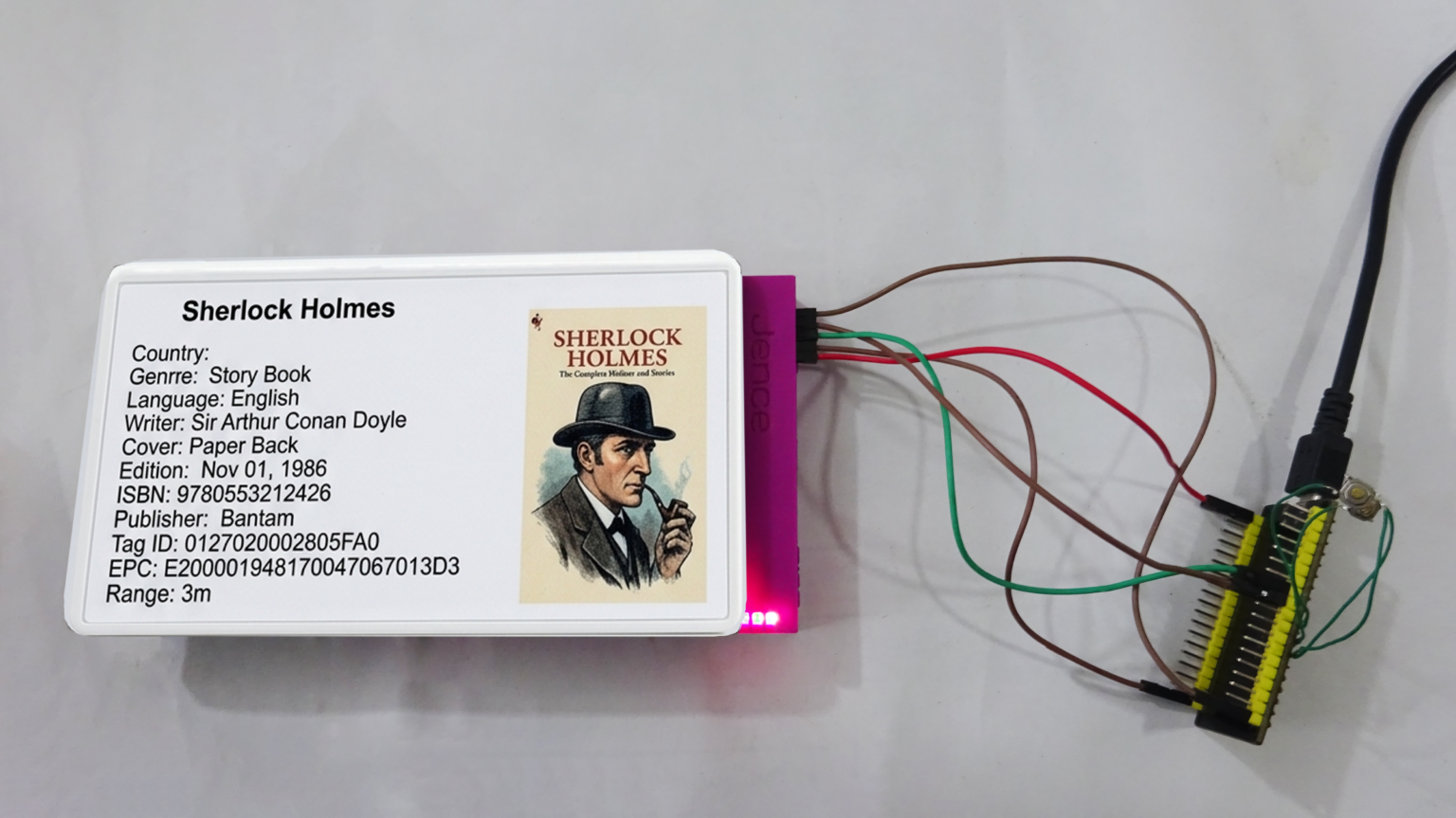
In a professional library, a unique EPC (Electronic Product Code) is assigned to a specific book. Using the J4212U uhf reader writer, you encode this unique ID into the tag’s memory. This mapping is what allows the rfid tag tracking system to identify a specific book (e.g., mapping E200001948170047067013D3 to Sherlock Holmes).
Prepare the ESP32, Reader Hardware and Other Components
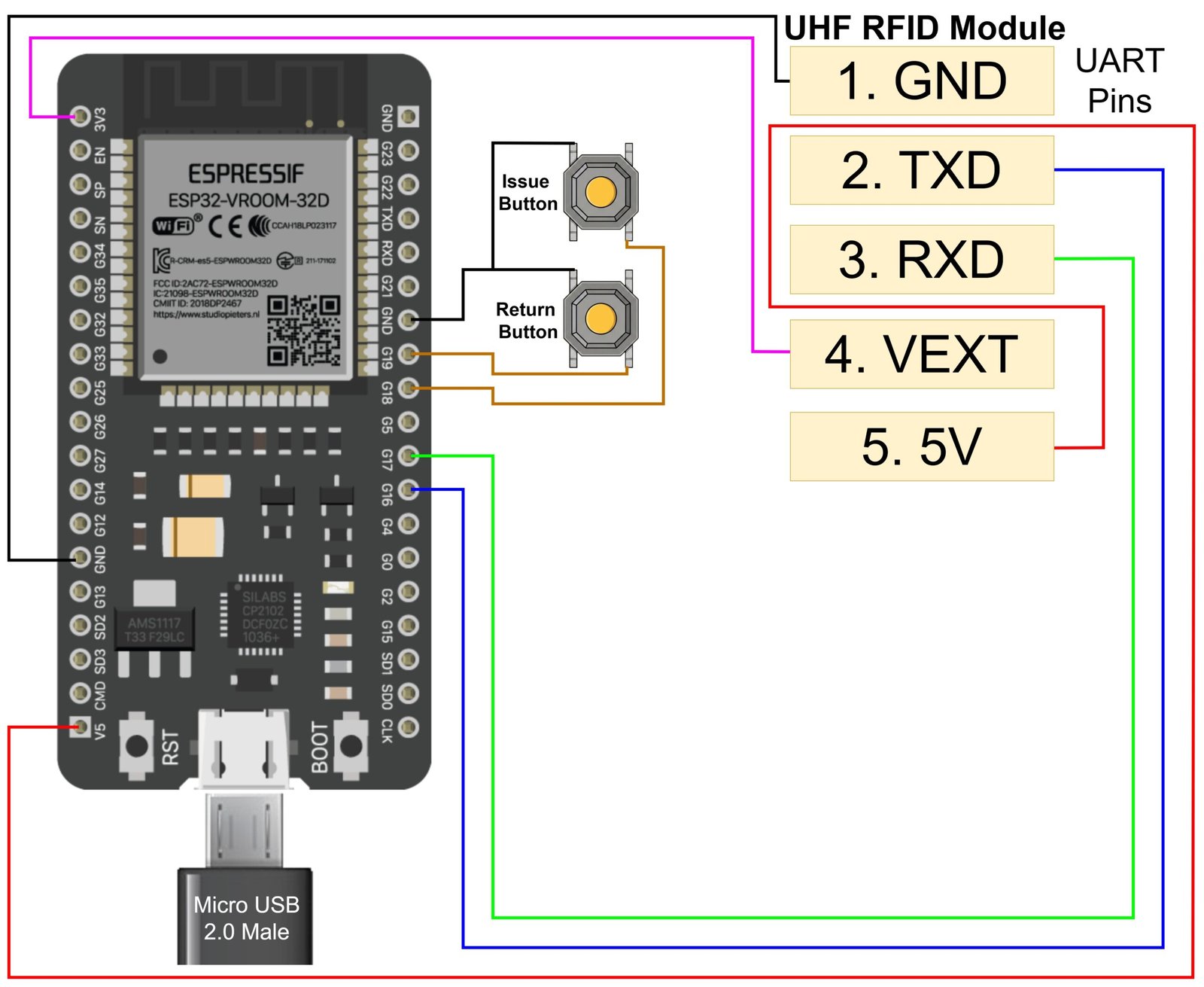
Circuit Diagram of the RFID Library Management System
Prepare the ESP32 and Reader Hardware
The JENCE J4212U communicates via a standard UART (Universal Asynchronous Receiver/Transmitter) connection, to send the complex tag data. Since the ESP32 has multiple UART ports, we’ll dedicate one (UART2) to the RFID reader.
Power Setup:
- System Power: In this build, the ESP32 is powered via its USB port. And the JENCE J4212U Reader receive its 5V power directly from the ESP32’s 5V pin. This keeps the logic of the project simple and compact.
- Pro Tip: While the ESP32 can power the reader, you can connect a dedicated external 5V power source to the JENCE reader’s 5V pin if you want to maximize its scanning efficiency and range.
UART Communication:
Connect the J4212U’s UART pins to the ESP32:
- J4212U TXD → ESP32 RXD2 (GPIO 16)
- J4212U RXD → ESP32 TXD2 (GPIO 17)
- J4212U GND → ESP32 GND
- J4212U VEXT → ESP32 3V3 (Logic High voltage)
- J4212U 5V → ESP32 5V
Interface Button Setup:
Connect ESP32 GPIO 18 to the Issue button: Tactile Switch’s one side. Then connect the switch’s other side to ESP32 GND
Connect EESP32 GPIO 19 to the Return button: Tactile Switch’s one side. Then connect the switch’s other side to ESP32 GND
Programming Logic and Inventory Safety
A critical feature of an rfid library management system is the prevention of “Impossible Transactions.” This is achieved through strict state management in the firmware.
Logic Gate: Inventory Safety
To protect library assets and ensure the database remains accurate, the system enforces two primary safety rules:
- Anti-Double Issue: If a book is already marked as ISSUED, the system blocks any further issue attempts. This prevents a book from being “loaned out” twice in the system without being returned.
- Anti-Double Return: If a book is already AVAILABLE (checked in), it cannot be returned again. This prevents accidental duplicate scans from creating false data entries.
The Hardcoded Demonstration Model
For rapid prototyping, EPC-to-Book mapping is often hardcoded in the ESP32 firmware using a struct:
- EPC E200001948170047067013D3 -> Sherlock Holmes (Arthur Conan Doyle)
- EPC E200206490090073172062B8 -> Gitobitan (Rabindra Nath Tagore)
Using the Preferences.h library, the “Issued” or “Available” status is saved to the ESP32’s non-volatile flash memory. This persistent storage ensures the library’s state is preserved even after a power reset.
You can download the Code from HERE. Use Arduino IDE.
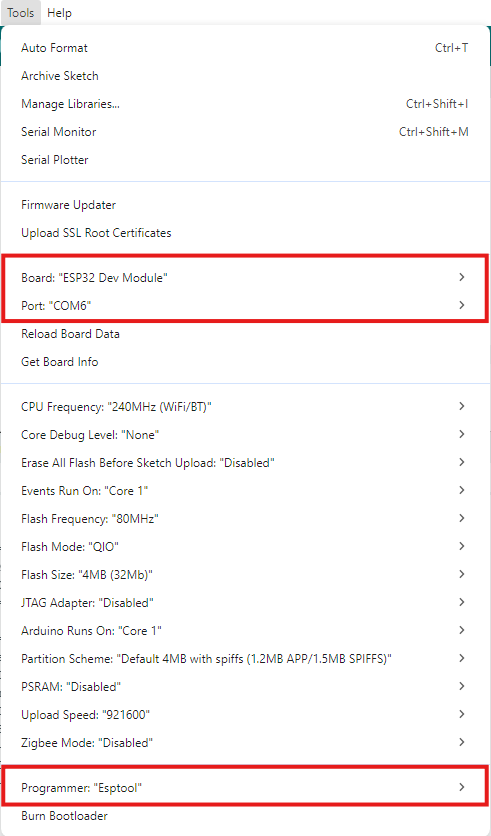
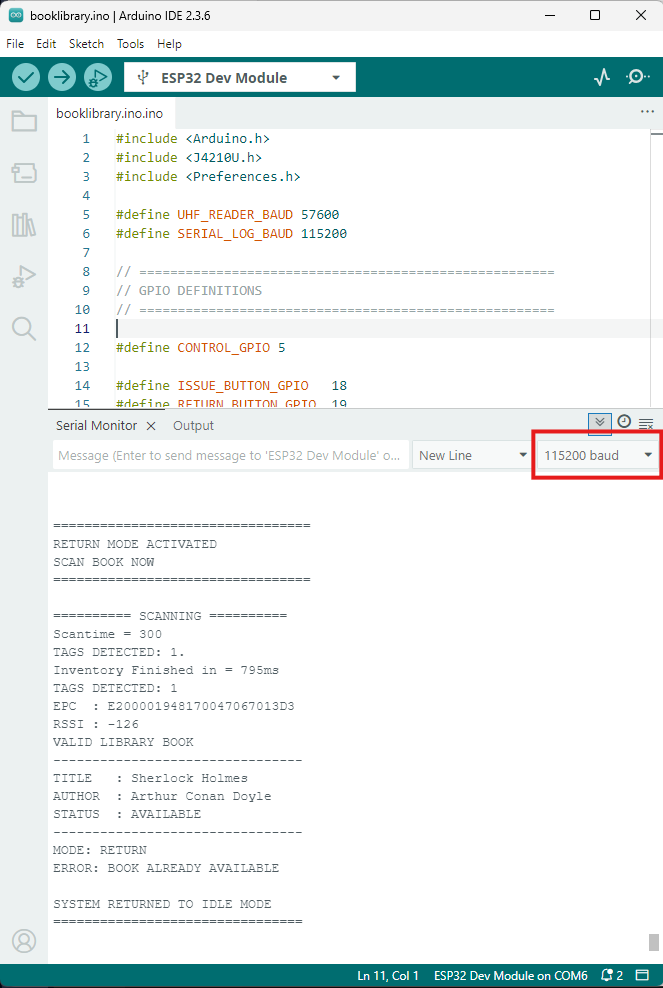
Make sure to correct the settings as shown in below images.
Circulation Desk: Real-World Operations
The J4212U makes transactions nearly instantaneous. Below are the serial monitor logs representing the daily workflow of a librarian using this system.
Scenario A: Renting a Book (Issue Mode)
The librarian presses the G18 button. The system scans for a tag and checks the flash memory for its current status.
ISSUE MODE ACTIVATED
SCAN BOOK NOW
EPC : E200001948170047067013D3
TITLE : Sherlock Holmes
STATUS : AVAILABLE
MODE: ISSUE
Saved status for: Sherlock Holmes
BOOK ISSUED SUCCESSFULLY
Scenario B: Returning a Book (Return Mode)
The librarian presses the G19 button. The system confirms the book was previously issued before clearing the record.
RETURN MODE ACTIVATED
SCAN BOOK NOW
EPC : E200001948170047067013D3
TITLE : Sherlock Holmes
STATUS : ISSUED
MODE: RETURN
Saved status for: Sherlock Holmes
BOOK RETURNED SUCCESSFULLY
Scenario C: Preventing Errors
If a librarian tries to return a book that is already on the shelf, the system intervenes:
RETURN MODE ACTIVATED
SCAN BOOK NOW
EPC : E200001948170047067013D3
STATUS : AVAILABLE
MODE: RETURN
ERROR: BOOK ALREADY AVAILABLE
Will add Video Later.
Professional Evolution: Scaling the System
While hardcoding is great for a project, professional rfid technology companies implement a dynamic database. Which can be Implemented in further revisions. In a scaled version:
- The J4212U reads a raw EPC.
- The ESP32 sends this EPC to a central server (SQL/Cloud).
- The server handles millions of rfid tags for inventory without requiring firmware updates.
- You can also add an rfid card reader to identify the patron during the same transaction window.
Troubleshooting: Common UART and RFID Issues
Setting up a uhf rfid reader arduino or ESP32 project can sometimes lead to communication hurdles. Here are the most common issues and how to solve them:
1. UART Communication Failures
- Baud Rate Mismatch: Ensure the UHF_READER_BAUD matches the reader’s default (usually 57600). If the Serial Monitor shows gibberish, check that your SERIAL_LOG_BAUD is set correctly (115200).
- Wiring RX/TX: A common mistake is connecting RX to RX. Remember: ESP32 TX (GPIO 17) goes to Reader RX, and ESP32 RX (GPIO 16) goes to Reader TX.
- Common Ground: Ensure the RFID reader and the ESP32 share a common Ground (GND) wire, otherwise the UART signals will be unstable.
2. RFID Read Failures
- Tag Interference: Metallic surfaces or liquids near the rfid antenna can “detune” the signal. Ensure the rfid label is applied to paper or plastic areas of the book.
- Power Supply: The J4212U is efficient, but if the ESP32 is also driving many LEDs or motors, the voltage might drop. Ensure the reader receives a stable 5V.
- Anti-Collision Overload: If dozens of tags are on the reader at once, ensure your code handles the Inventory results properly to avoid missing a specific rfid chip.
Transforming Your Library With JENCE
Implementing an rfid library system with the JENCE J4212U and an ESP32 is a strategic leap into modern automation. By replacing manual barcode scanning with radio frequency identification technology, you eliminate “double-issue” errors, slash checkout times, and protect library assets with high-efficiency security.
Subscribe to our newsletter :
